Loading
Showing posts with label Facebook. Show all posts

Sunday, September 18, 2011

How to embed Facebook video in your blog


Facebook is not provide an embed cod for video sharing unlike youtube.  There are time you find an intersting video from Facebook and want to share it to your blog reader but didn't get the embed code. Since you did not have the embed cod, you need simple trick to share or embed the facebook video into your blog.
  1. Go to your friend or the video owner Facebook account.
  2. Click on th video link below the profile picture.
  3. Choose the video you want to share, click on the video.
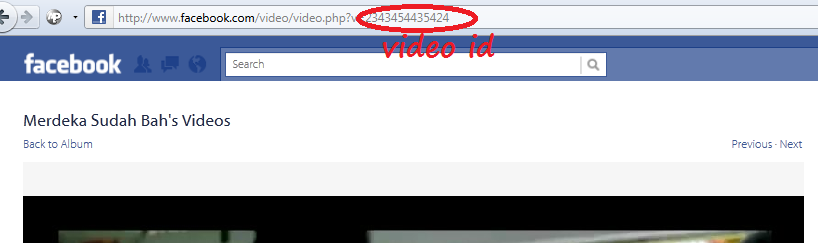
  4. You need to identify the video id. (see picture below).

After that use this code, just copy to your blog  :-
<object width="400" height="224" >
 <param name="allowfullscreen" value="true" />
 <param name="allowscriptaccess" value="always" />
 <param name="movie" value="http://www.facebook.com/v/xxx" />
 <embed src="http://www.facebook.com/v/xxx" type="application/x-shockwave-flash"
   allowscriptaccess="always" allowfullscreen="true" width="400" height="224">
 </embed>
</object>
Change the XXX with the  video ID. Done...  :)


Wednesday, August 17, 2011

obsessed with facebook


i admit that i addicted to facebook and because of that i had created my own eBook teaching you the fastest and easy way to create a professional fanpage. Get if now and start to create your professional fanpage , i give this eBook 100% free. Download eBook - Facebook iFrame- Static HTML.


Today i wanna show you the video how obsessed this world with facebook

since facebook are growing each day, there are huge potential for business owner take advantage to reach their target customer.


Thursday, August 11, 2011

eBook: iFrames Tutorial for Facebook – Create A Custom Page With “Static HTML iFrames Tab”


Everyone who use internet having an Facbook account and now days there are many giant company or organizations, business owner and brand even schools . In a simple word there are millions facebook Fanpage today. There are many advantages using Facebook and most importantly, its free and having lagers user worldwide.


I had wrote eBook how to create a custom Facebook iFrame using Static HTML. Before this , facebook decide not to support FBML apps. As of 18th March 2011 the Static FBML App can no longer be uploaded to facebook business pages. The "Static HTML: iframe tabs" Application is a great substitute, with far greater functionality than the Static FBML App ever had.

This eBook will explain to you how you can create professional fanpage in three simple steps. You will know how to create reveal page (for those who did not like your page) and member page (already hit LIKE button). There are many things you can to and integrate with your facebook fanpage. Knowing a HTML coding will be an advantage for you.
1. How to setup Facebook Fanpage
2. Adding iFrame – Static HTML
3. Customize your static HTML –iFrame Tabs

There are many others that can help you to create professional fanpage but I guarantee my methos is the easiest one but excellent result. Get your free copy of tutorial to create Facebook iFrame –Static HTML.


Sunday, March 13, 2011

How to remove unwanted facebook group.


User can add someone to a group automatically and imagine if you already added into ten (10) group without knowing what that group really are. This tutorial will guide you how to remove unwanted group from facebook.

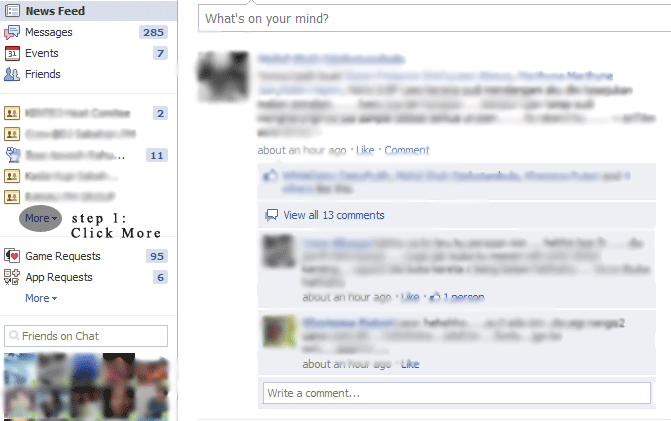
Just after login into your facebook account, click home at the top right of your page. Here is the tutorial step by step how to remove unwanted facebook group.

Step1.
I assume you are in home of Facebook, now scroll down a bit until you see the group list and click more

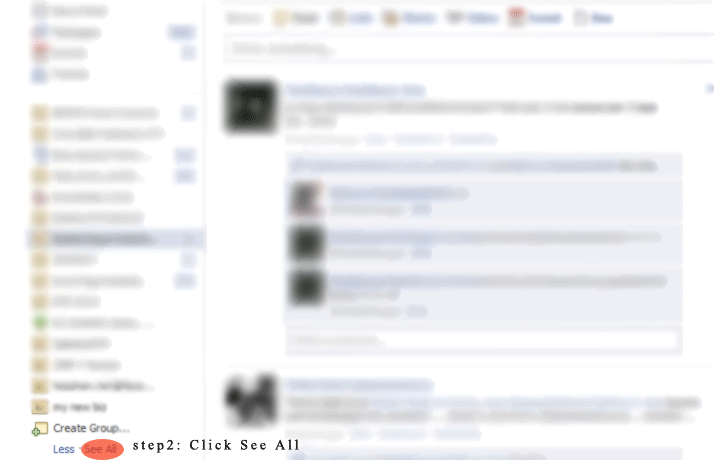
Step2,
You will get many list of group … go to the bottom of that list and click See All.

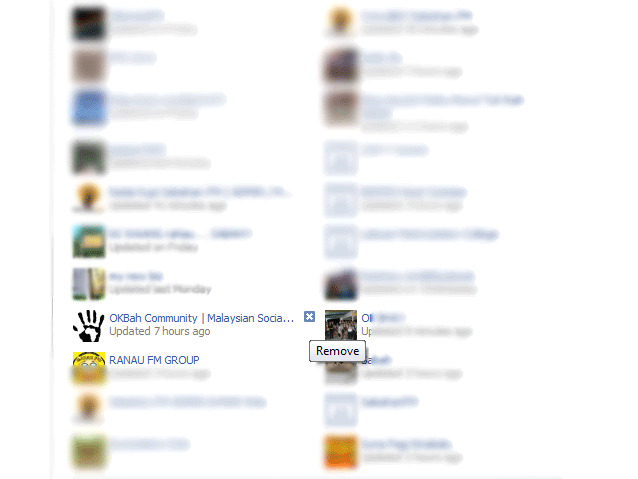
Step 3.
You will come to new page, scroll down until you see all the group and just put your mouse over the group you wish to remove. By this point, you will see the “X” at the corner of the pic. Just click the “X” and you done.


Wednesday, December 22, 2010

How to get a message from Facebook Invite? Buy now.


And now that the geek world is craving for just one thing – Facebook Message Invites, somebody had to write this.
Facebook Message Service is supposed to go live soon, and you can apply for an early invite from this page.
If you don’t want to wait for an invite, you can even buy a Facebook Message invite. Looks like some one is already selling it on EBay. Here’s what the seller promises.


Want to access Facebook’s new messaging product: Social Inbox.  We have decided to auction of an invite to the product for charity.  Here’s what you’ll get when bidding on this item:
  • An invite to Facebook’s Social Inbox which includes an @facebook.com email address
  • A product to stay up to date with your friends easily via SMS, email, IM, and Facebook messaging.
The winner of this auction will have to friend Nick O’Neill on Facebook in order to receive the invite.  Once you’ve won you can add him here.
Now, that’s taking real advantage of the situation. Good one Neil !


Friday, December 17, 2010

15 Cool Facebook Wallpaper for Windows/Mac/Linux themes


Available in a resolution of 1024 x 768 pixels and 1920 x 1200 pixels.
facebook wallpaper themes
Look for the button "Download file" on the right to obtain Facebook wallpaper. The ZIP file contains both resolutions of resolutions in JPG format.
Available in a resolution of 1280 x 1024 pixels.
facebook wallpaper themes
Available in a resolution of 1680 x 1050 pixels.
facebook wallpaper themes
Look for the 'Download image' in the bottom right button to download the high resolution JPG.
Available in a resolution of 1680 x 1050 pixels.
cool wallpapers
Look for the 'Download image' in the bottom right button to download the high resolution JPG.
Available in a resolution dated 1900 x 1200 pixels.
cool wallpapers
Available in a resolution of 1920 x 1080
cool wallpapers
Look for the 'Download image' in the bottom right button to download the high resolution PNG.
Available in a resolution of 1920 x 1200
facebook shadows
Look for the 'Download image' in the bottom right button to download the high resolution JPG.
Available in a resolution of 1920 x 1200 pixels.
Facebook World
Available in a resolution of 2560 x 1600 pixels.
domo facebook wallpaper
Look for the 'Download image' in the bottom right button to download the high resolution JPG.
The wallpapers in this section are automatically displayed in the right of the screen resolution. Results may vary.
Click on the link 'Download at...' to access the converter wallpaper, which allows you to choose other available resolutions. You can also select between the JPG or PNG file format.
facebook addicted
facebook theme
the real facebook
facebook tag
facebook wallpaper
facebook wallpapers
Not sure how to change the desktop wallpaper?

Browse all our Facebook here-related articles.


Thursday, August 26, 2010

#Spreadthelove with @Churp2! Be part of the family and we could both be rewarded! What are you waiting for?


Saturday, August 21, 2010

Download email address from your facebook account


I am always wondering if I can download email address of my friends on facebook. I had spent few days searching the way how I can download all my friends’ hosted email on facebook. We all know the email security of facebook, not easy to get.
Some of you might didn’t know how important this email list. If you want to know how to make money fast, the email address list is one of the answers.
We can use yahoo to get all email address from all your friends on facebook account.

Steps to download email address from your facebook account.
1.Login into your yahoo account
2.Select contact
3.Import
4.Select facebook
5.Follow the screen instructions
6.Select tools
7.Export.
8.Download the email list

Video below might explain to you in details.


Friday, April 23, 2010

My Dream Destination.


Traveling is a big dream for those who never have a chance traveling especially going overseas as me. Main question across my head is where should I go if have a chance traveling overseas for one in my life? There are many places I was jot down on my note pad and try to figure out what are the special things for each places and why I must choose it. Thousands reason need to consider before make a final choice.

Make decision is not an easy task because it just only ONE chance and must really careful. Enjoy, have fun, get new experiences and new knowledge is my objective for this golden opportunity and here it go….. My Dream Destination…. Vietnam. The main reason I choose Vietnam is, I heard a rumor Sabahan (Kadazan Dusun) are from Vietnam. I will try to make some research because the Dusun language almost same to local language in Vietnam. Is the culture same in Sabah? It just a rumor and to proof it right or not … research need to be done. …. MAStraveller.com please fly me to My Dream Destination. :)


Project alpha season 2 is a program to uncovering Malaysia’s Top Bloggers Presented Adidas Action 3. Watch Episodes 4-7 of Project Alpha Season 2.


Episodes 4


Episodes 5


Episodes 6


Episodes 7

Project Alpha Season 2 is presented by Adidas Action 3 and supported by P1 and MAStraveller.com


Saturday, April 10, 2010

how to embed Facebook video into blog and website.


Embed video from you tube is easy because the embed code is shown but how about Facebook Video, no embed code shown? There are few solutions either manually or using Add-ons. In this tutorial i will share how to embed Facebook video into your blog or website using Mozila Firefox Add-ons.

Facebook Video is an Add-ons for Mozila Firefox helps us to embed video without writing complicated code. Just a single click , you can copy and paste the embed code into your blog or website.

Steps to embed Facebook Video into your blog or website.

1. Install Facebook Video into your Mozilla Firefox Add-ons.
2. Restart browser
3. Login into your Facebook account and find the video you want to embed.
4. On the video you can find an options such as Embed Video, Customize Code,Download Video and Convert Video.
new options after install Facebook Video Add-Ons
just copy and paste the embed code into your blog or website.


Tuesday, March 30, 2010

Download Facebook Photo Album


I believe all of us who online every day have at lease one facebook account. Facebook become popular because of the application on it beside can share your status,share pictures and find your long lost friend or new friends.

There are many advantage in facebook and one of it is picture sharing. Pictures is very valuable because it keep our memory last forever. I was wondering how can i save the photo album in Facebook because it will take time if save the pictures one by one. Thabks to uncle Google, most of my question he manage to give the correct answer.

FacePAD, better known as the Facebook Photo Album Downloader will allow you to download your friends’ facebook albums, events albums, and group Albums, en masse, with the click of a button.

Download the FacePAD add-ons for firefox and follow instructions ...

How to download the picture album? It just a click, right muse click on the link of photo album you want to download and select "Download Album with FacePAD". Downloading will start automaticly, just wait until the downloading process complete.
congratulations.. you just download the photo album from facebok and save it as your copy and let the pictures remind us our memorable moment.


Thursday, February 11, 2010

Free SMS from Facebook


Social networking become more popular and yet million applications build to make the social networking web more attractive.Facebook now become No 1 social networking website and it more exciting because by Facebook you can send sms to anyway around the globe for free. Here are simple steps to use this application.

1. Login to your Facebook account
2. Click http://apps.facebook.com/chatsms
3. Allow
4. Add to your profile
5. Change the country code from Singapore to your country
6. Add handphone number you wish tu send sms
7. Write your message
8. Send sms
9. Wait for confirmations

good luck.... and enjoy your free sms using Facebook


Related Posts Plugin for WordPress, Blogger...
Twitter Delicious Facebook Digg Favorites More