- Go to your friend or the video owner Facebook account.
- Click on th video link below the profile picture.
- Choose the video you want to share, click on the video.
- You need to identify the video id. (see picture below).
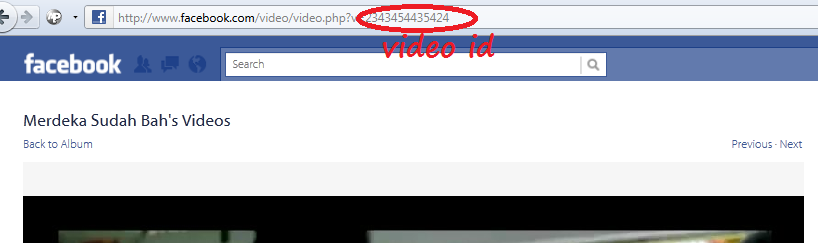
After that use this code, just copy to your blog :-
Change the XXX with the video ID. Done... :)<object width="400" height="224" > <param name="allowfullscreen" value="true" /> <param name="allowscriptaccess" value="always" /> <param name="movie" value="http://www.facebook.com/v/xxx" /> <embed src="http://www.facebook.com/v/xxx" type="application/x-shockwave-flash" allowscriptaccess="always" allowfullscreen="true" width="400" height="224"> </embed> </object>
wow, this is nice idea for video marketing,
ReplyDeletebecause i am going to update my websites video on youtube soon and will wish to see more views.
Facebook Applications |
facebook apps information